Mullvad's free public encrypted DNS service, the DNS over HTTPS and DNS over TLS resolvers at dns.mullvad.net and its five filtering variants, was scheduled to be discontinued on November 2, 2026. Mullvad now sponsors Quad9 instead and recommends it as the replacement. Anyone who typed a Mullvad DNS hostname into a browser, Android Private DNS, a router or an iOS or macOS profile should switch to another resolver now.
Mullvad VPN users who rely on the app's built-in DNS inside the tunnel are not the target of this change. This post covers what was shut down, why, which settings to change, verified replacement addresses, and how to confirm which resolver a device really uses.
What Mullvad shut down and why
Mullvad is retiring its public encrypted DNS service only, not its VPN. Mullvad announced the move on its blog on September 3, 2026 , and its DNS over HTTPS and DNS over TLS help page states that the service "will be discontinued on November 2, 2026."
The company gives two reasons. First, the servers add nothing for its VPN customers, because VPN traffic is already encrypted and the VPN's own resolver handles queries. Second, it considers running a privacy-focused public resolver a specialized job and prefers to fund Quad9, which it calls the leader in the field, rather than duplicate that work. Mullvad says it will financially support Quad9 but does not name an amount.
The service launched as a free alternative for people who wanted encrypted DNS without a VPN. In 2023, ghacks reported that Mullvad's public encrypted DNS servers moved to RAM-only operation ; that infrastructure is what is going away.
Which Mullvad DNS settings stop working
Every manual configuration that points to a Mullvad DNS hostname or address is affected. The help page lists these six resolvers:
dns.mullvad.net (194.242.2.2): no blocking
adblock.dns.mullvad.net (194.242.2.3): ads and trackers
base.dns.mullvad.net (194.242.2.4): ads, trackers and malware
extended.dns.mullvad.net (194.242.2.5): base plus social media
family.dns.mullvad.net (194.242.2.6): base plus adult content and gambling
all.dns.mullvad.net (194.242.2.9): all of the above
The older hostnames doh.mullvad.net and dot.mullvad.net, which the help page already listed as replaced, should be removed as well. Mullvad's blog adds three platform notes:
Mullvad Browser: users on the default DNS over HTTPS setting or the included ad-blocking option are moved to Quad9 automatically. Custom settings are not changed, so anyone who picked base, extended or family should switch back to the default.
iOS and macOS: Mullvad DNS configuration profiles stop working. Delete them and install a Quad9 profile instead.
Everything else (browsers, Android, routers, Windows): replace the hostname or DoH URL by hand.
Replacement resolvers with DoH and DoT addresses
All addresses below come from each provider's own documentation:
The plain IPv4 addresses are 9.9.9.9 and 149.112.112.112 for Quad9 , 94.140.14.14 and 94.140.15.15 for AdGuard DNS , 86.54.11.13 and 86.54.11.213 for DNS4EU , and 1.1.1.1 and 1.0.0.1 for Cloudflare .
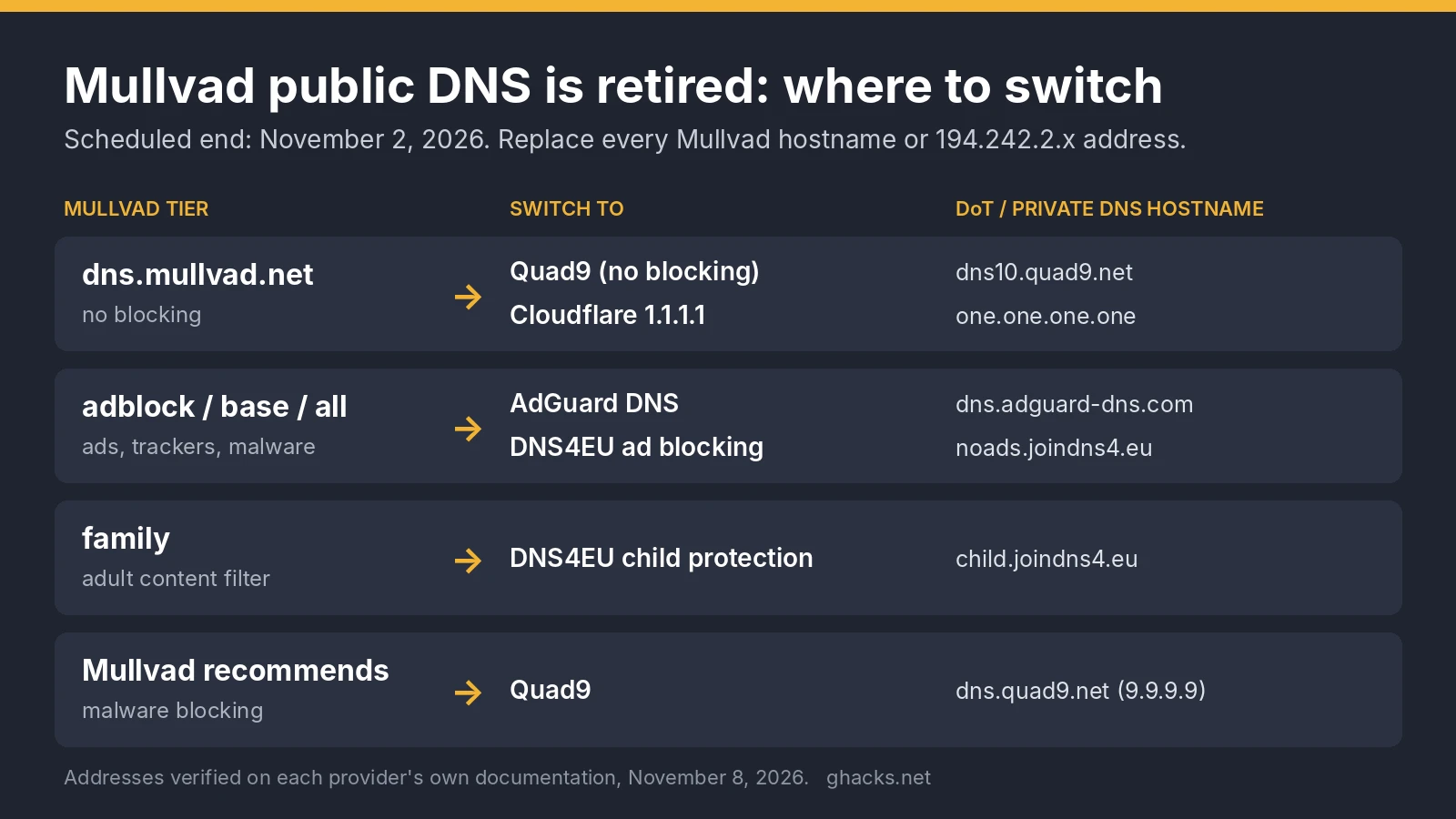
Which one replaces which Mullvad tier:
dns.mullvad.net: Quad9 no-blocking or Cloudflare.
adblock, base or all: AdGuard DNS or DNS4EU ad blocking, both of which filter ads and trackers. AdGuard says it processes no personal data on its public servers; DNS4EU, operated by Whalebone in the Czech Republic, says client IPs are anonymised before logging.
family: DNS4EU's child protection variant (child.joindns4.eu).
Cloudflare says it keeps no source IPs in non-volatile storage and deletes truncated IPs within 25 hours. Our older look at AdGuard DNS and its filtering explains the blocking approach in more detail. To enter any of these in a browser, follow our guide to enabling DNS over HTTPS in Chrome, Brave, Edge and Firefox .
How to check which resolver a device uses
The quickest check is the provider's own test page, opened on the device you changed. Quad9's on.quad9.net answers yes or no, and Cloudflare's one.one.one.one/help runs a set of tests that show whether the connection to 1.1.1.1 works.
Open the browser's secure DNS setting first. A browser DoH provider overrides the system resolver, and Quad9 notes that Firefox and Brave may default to Cloudflare in some regions.
On Windows, run ipconfig /all in a terminal and read the DNS Servers lines for the active adapter. Any 194.242.2.x address is a leftover Mullvad entry.
On Android, open Settings, for Private DNS and confirm the hostname. Replace any Mullvad hostname with one from the table above.
On iOS and macOS, check the installed profiles under VPN and Device Management and remove any Mullvad DNS profile. iCloud Private Relay must be off for a third-party resolver to apply.
If a VPN is active, enter the new resolver in the VPN client's custom DNS setting, because VPNs usually ignore the device setting.
Do not mix providers: Quad9's test reports "no" when a device lists a Quad9 address to one from another resolver.
Related: display all cached DNS entries on Windows , Control D, the DNS service from the makers of Windscribe
Which resolver did you move to after Mullvad's DNS shutdown, and did you keep ad blocking at the DNS level or move it to the browser?
The full story
This article is one source in a clustered incident — the cluster page carries the summary, timeline and every other outlet covering it.
