This article will be part of a two-article series focusin📜 Introductionel free to skip to " DOMPurify 3.1.0 bypass (found by @IceFont 👑) ".
Before diving into the technical details, I believe it's important to quickly explain how a client-side HTML sanitizer works.
Essentially, what you need to keep in mind is that using a client-side sanitizer leverages the browser's HTML parser, limiting the potential for parsing differentials to occur. For instance, using a client-side HTML sanitizer, by design, issues involving incorrect parsing won't have any impact, as the same HTML parser is used twice anyway.
Fig. 1 : Golang bluemonday HTML sanitizer bypass due to inconsistent HTML parsing in x/net/html found by @gregxsunday ( ref ).
If you want to easily reproduce this issue on your side, you can use pybluemonday version child restriction, which blocks it from having another nested :
Fig. 4 : HTML Specification - The form element ( ref ).
Fig. 5 : Double parsing mutation using element's parsing properties.
You can manually edit the string at the top, and the result will appear at the bottom. It uses 'pipelines', meaning that here, we see the result of double HTML parsing using the DOMParser method. Thanks to @BitK_ for this excellent interactive DOM Tree rendering tool ( link ).
Additionally, when parsing an HTML DOM tree from a string, there are several rules that describe how each tag has to be interpreted. Among these rules described in the HTML specification , some are related to the concept of namespace.
Each of these namespaces has its own parsing rules, meaning that a tag, depending on its context, can be interpreted in completely different ways. This is one of the key reasons that makes HTML sanitization complicated, even on the client side.
For example, the element is treated as text in the HTML namespace, while within the MathML or SVG namespace, it would be treated as HTML.
Fig. 6 : Parsing of the element in the HTML namespace.
Fig. 7 : Parsing of the element in the SVG namespace.
The above two behaviors are also used with HTML integration points and MathML text integration points to switch from the SVG and MathML namespace to the HTML one.
List of MathML text integration points :
List of HTML integration points :
Fig. 8 : Example of HTML integration points usage.
Many more advanced mutation techniques have already been discovered and documented by great researchers. Since explaining every existing mutation and their potential dangers would take too long, I recommend checking out these resources if you haven't already (I'm probably missing a lot of great ones):
Now that we have all the necessary information to understand the upcoming sections, let's start discussing the bypasses.
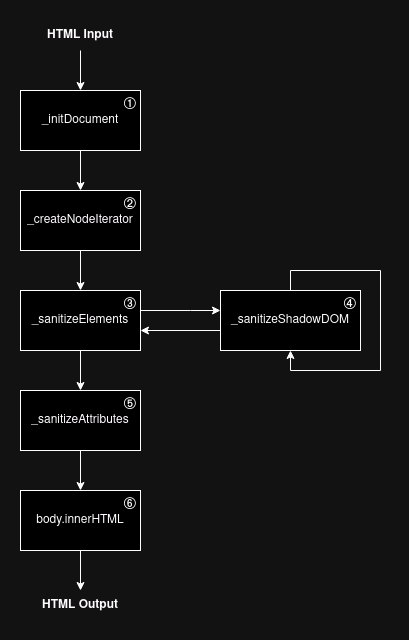
The story begins on April 26, 2024, when @cure53berlin posted a full DOMPurify bypass in versions tag is flattened out of the tag, it remains part of the SVG namespace.
This strongly indicates that the flattening occurs after the node has been parsed. As a result, it's possible to create an "invalid" HTML DOM tree, which would lead to another mutation if it is serialized and parsed again.
For example, if an tag is a child of another tag within the HTML namespace, it gets popped out. However, if we flatten an tag from the SVG namespace into the HTML namespace, it won't get popped out!
Fig. 14 : Nested without flattening.
Fig. 15 : Nested with flattening.
Being able to return "invalid" HTML out of a sanitizer is a strong mutation gadget, as most of the time it will result in a mutation when reparsing it.
The last piece requires a deep understanding of how HTML parse states are handled. For this bypass, we are going to focus on two concepts: HTML insertion modes and the stack of open elements . As explained in the HTML specification, HTML insertion modes aim to define how tokens are processed while parsing an HTML string.
Fig. 16 : HTML Specification - The insertion mode ( ref )
For instance, based on the in caption insertion mode definition, if the parser finds a start tag, it needs to pop elements from the stack of open elements until a element has been popped out.
Fig. 17 : HTML Specification - Parsing main incaption ( ref ).
What is the stack of open elements?
Essentially, it's a LIFO (Last In First Out) stack of HTML elements. This stack grows as the HTML parser processes the provided string.
Fig. 18 : HTML Specification - The stack of open elements ( ref ).
Fig. 19 : Example of stack of open elements for a caption element.
If we revisit the in caption insertion mode : popping out elements from the stack of open elements until finding a element will result in popping out all elements below the nested element (even if they are valid in that context :D).
Fig. 20 : Example of in caption handling in the case of nested .
What makes it even more interesting is that, even if this is HTML namespace specific, it doesn't take into account the namespace of the tag that gets popped out as they are part of the stack of open elements .
Fig. 21 : Example of in caption handling in the case of nested with nested SVG namespace elements.
Finally, to generate this situation using node flattening, @IcesFont used the fact that the in caption insertion mode falls back to the in body insertion mode, which "resets" the parent in table insertion mode.
Fig. 22 : HTML Specification - Parsing main incaption ( ref ).
Because of that, it is possible to get a valid context where can be nested, allowing for the creation of the above "invalid" situation using flattening :D
Fig. 23 : Parsing of nested using the in table insertion mode without flattening.
Fig. 24 : Parsing of nested using the in table insertion mode with flattening.
If we bring everything that has been explained in this section together, it is possible to craft the following HTML payload, which bypasses DOMPurify version is present at the same level as the second tag, making Firefox not vulnerable to this mutation. However, @kinugawamasato discovered another mutation using deep nesting, which works on Firefox, Chromium, and Safari (we won't cover that one here).
Fig. 25 : DOMPurify , the _isClobbered function has been updated to enforce it to be an integer.
Fig. 27 : DOMPurify's 3.1.1 _isClobbered function.
Even if the fix might look great at first glance, a small mistake has been made regarding how the .parentNode property is accessed. In the fix, currentNode.parentNode.__depth is being used. Why is this a problem? Essentially, it allows clobbering the parentNode property with a node that doesn't have the __depth property yet, allowing the count to reset!
Fig. 28 : Example of __depth clobbering through the .parentNode property.
Using this bug twice in a row is required for the fix, as 255 * 2 = 510, which doesn't reach the flattening limit. This can be done by using the nested mutation described in the " Why are mutation XSS (mXSS) possible?" section.
For the same reason as the bypass, this one isn't working in Firefox.
Fig. 29 : DOMPurify element using a custom JS script. At least, thanks to this, I found an interesting mutation:
Fig. 39 : "Elevator" HTML mutation example 1.
Fig. 40 : "Elevator" HTML mutation example 2.
Take care the tag :D The tags can be replaced by , , or .
Essentially, the tags between two elements determine where the stack of open elements gets popped down. What makes this behavior even more interesting is that it can even traverse namespaces as long as one tag from each traversed namespace is present between the two elements.
Fig. 41 : Example of "elevator" mutation without a tag from each namespace to traverse.
Fig. 42 : Example of "elevator" mutation with a tag from each namespace to traverse.
I tried to figure out where in the specification this behavior was described, and it seems to be related to this:
Fig. 43 : HTML Specification - Has an element in the specific scope ( ref )
Even if this mutation is quite powerful, it wasn't enough to bypass DOMPurify tag conversion to .
You can try to update the tag with an tag in the HTML namespace, you should see that it doesn't work anymore.
As we can see, the tag conversion to in the HTML namespace leads to the same behavior if there is another tag in the SVG namespace subtree. Additionally, thanks to the tag, which is allowed in both SVG and HTML namespaces by DOMPurify, it is possible to trigger the bug properly!
What makes this mutation more interesting than the one for a DOMPurify bypass?
Basically, DOMPurify blocks the usage of HTML integration points only if it is used to switch from the SVG to HTML namespace. For instance, the following is fully valid and won't be removed.
Fig. 46 : Example of HTML integration points usage without switching to HTML with DOMPurify.
Based on this, we can use node flattening to flatten the tag out of the , which will create the right combination for DOMPurify sanitizing!
If we bring everything that has been explained in this section together, it is possible to craft the following HTML bypass which bypasses DOMPurify version / reordering and node flattening again. How? For this, we need to "chain" several mutations.
The first one is related to how nested form parsing reacts if a , , , or is present between them. Under those conditions, tags at the same level as the first tag get bumped into it.
Fig. 49 : / reordering
On Firefox, chaining it with the nested mutation, this is enough to trigger a triple parsing mutation bug that bumps up an element. However, this is not the case on Chromium and Safari. I thought this might be related to HTML quirks mode, but I was wrong, and I have no idea where this parsing difference comes from. ¯\_(ツ)_/¯
Fig. 50 : Firefox / reordering (triple HTML parsing).
Fig. 51 : Chromium / reordering (triple HTML parsing).
Therefore, after some fuzzing, @ryotkak and @hash_kitten found that mixing the mutation and adding any tag before the one allows the behavior to work on both Firefox, Chromium and Safari.
Fig. 52 : / reordering (triple HTML parsing) working on Firefox, Chromium and Safari.
Using this, it is possible to control how much an element gets bumped up by simply repeating the payload several times in a row :D
Fig. 53 : Example of two-level bumped tag using / reordering.
Don't forgot that the tag can be replaced with , or .
The last thing to do is to craft a payload that reaches the node flattening only on the second parsing, forcing the XSS mutation to occur on the third one!
If we bring everything that has been explained in this section together, it is possible to craft the following HTML payload, which bypasses DOMPurify version <= 3.1.2 in the case of triple HTML parsing ️🔥
This time it works on Firefox!
Fig. 54 : DOMPurify <= 3.1.2 triple HTML parsing bypass example 1.
The payload shows the case where the third HTML parsing occurs after the DOMPurify sanitization. Therefore, as we discussed earlier, this can be used in the case of pre-HTML parsing (client-side or server-side) before the DOMPurify sanitization. If we mix this payload with the DOMPurify <= 3.1.2 bypass, it is possible to have a working payload in most cases!
Fig. 55 : DOMPurify <= 3.1.0 triple HTML parsing bypass example 2.
A double DOMPurify.sanitize has been used for the showcase, I believe it shows how strong this payload is! :D
Oh, and this works perfectly on outdated mermaid.js versions, but I leave it as an exercise :p
Because of the triple HTML parsing bypass, @cure53berlin decided to fix the problem at its root cause: HTML attributes. Since all the recent DOMPurify bypasses involve namespace confusion attacks using HTML attributes to smuggle an HTML , they decided to remove any attribute containing this pattern. Thanks to this mitigation, even an n-time HTML parsing mutation will be detected and sanitized from the first parsing by DOMPurify.
Fig. 58 : Fig. 30: GitHub diff between DOMPurify versions 3.1.3 and 3.1.2 ( ref ).
To conclude, this article has covered four DOMPurify bypasses: three related to the default configurations for versions <= 3.1.0 , 3.1.1 , and 3.1.2 , and one based on triple HTML parsing payloads. We've seen that HTML can be highly unpredictable, with many specific behaviors such as node flattening, insertion modes, and the stack of open elements capable of generating various mutations that lead to unexpected results.
Moreover, while the latest DOMPurify fix is robust, it also means that the library's security now relies heavily on a single regular expression. In the second article, we will explore how and why this reliance can become problematic in certain configurations and use cases :D
Finally, I would like to thank @IcesFont , @hash_kitten , and @ryotkak for allowing me to write all the findings. Additionally, I want to extend my gratitude to @cure53berlin for their incredible responsiveness to each report ❤️
DOMPurify is an amazing library; keep using it!
The full story
This article is one source in a clustered incident — the cluster page carries the summary, timeline and every other outlet covering it.
