Fortect finds malware, unwanted programs and the Windows damage they leave behind, and repairs it in one pass.
An automatic scan checks installed programs, startup items and browser extensions for anything that came with a program called Shift Browser that you did not choose to install.
Do it yourself · free Remove Shift Browser yourself 5 steps, 15 minutes, no software needed.
Shift Browser: summary
Scan the PC with security software to find and remove the malware and anything installed with it. Fortect scans Windows for malware and repairs the system files and settings it damaged.
Facts checked on 13 October 2026 against the Heimdal Security analysis and the Malwarebytes detection page, which we read in full. Our check was desk research: Shift Browser is a program name, so our server made no request, and we installed nothing. Not tested:
the leftover start entries
Is Shift Browser malware? The short answer
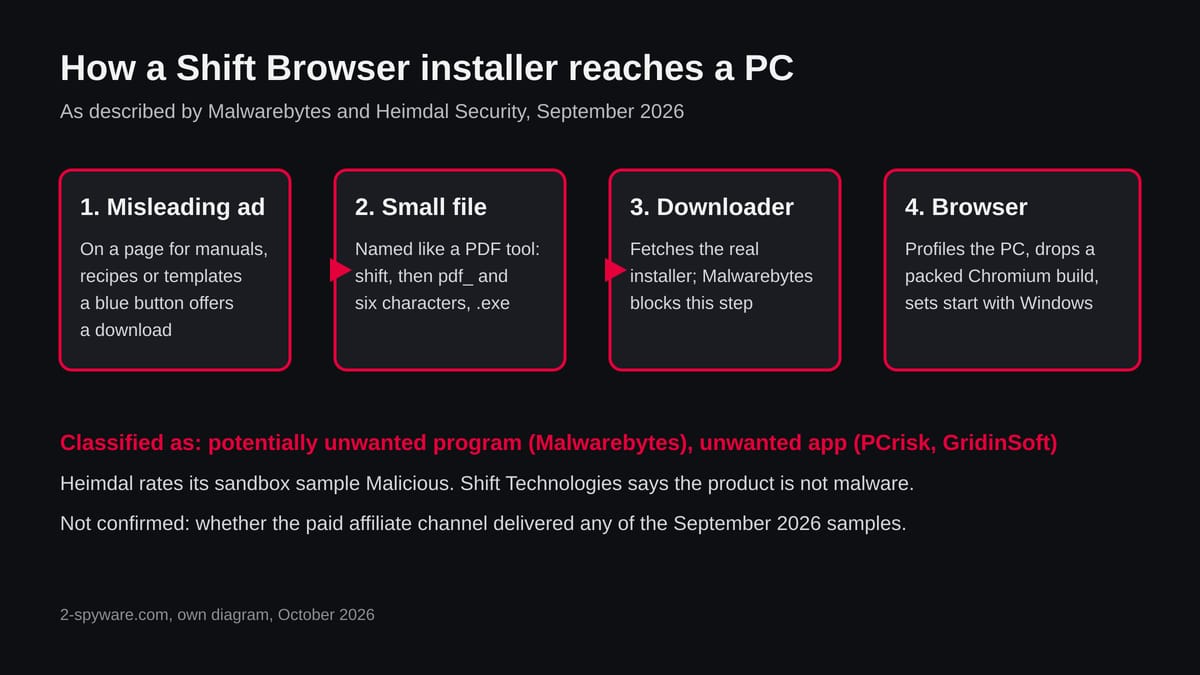
Shift Browser is a real program made by a company called Shift Technologies, and the security vendors we read do not call it a virus. Malwarebytes detects its installer as PUP.Optional.ShiftBrowser, a potentially unwanted program. Heimdal Security, which analysed samples in September 2026, rated one of them Malicious in its sandbox. The company behind it says the product is not malware.
Both statements can be true at once. A program can be a working browser and still be unwanted when it reaches you through a misleading ad, starts with Windows without being asked and is hard to uninstall. People who for "shift browser malware" usually met it that way: a download they did not mean to start.
Is Shift Browser dangerous? What it collects
What our own check could and could not do
There is no website to test here, so there is no site test screenshot. Our server ran no request against a Shift address and we installed nothing, so everything below comes from pages we read, not from us running the installer.
Shift Browser · desk research · 13 October 2026
Site test from our server Not applicable: the subject is a program name, not an address, so no plain request was made.
Vendor classification Malwarebytes: potentially unwanted program. PCrisk and GridinSoft: unwanted application with hijacking behaviour (through Heimdal's write-up).
Delivery Misleading ads on pages where people look for manuals, recipes and templates, and installers named like a PDF tool.
Behaviour reported by users Starts with Windows, changes default browser settings, resists the normal uninstaller (reported by users, summarised by Heimdal, not tested by us).
Password theft or file encryption No source we read reports it for the real Shift installer. That is absence of reports, not proof.
Medium risk Treat it as unwanted software, not as a proven stealer. This is desk research on 13 October 2026: we ran nothing, and a quiet record never clears a program, because ad driven installers change by country, device and time.
What was reported and when
October 2024 Malwarebytes flags the installer Malwarebytes lists the installer as PUP.Optional.ShiftBrowser. Its page says the browser is through misleading ads on sites where people look for manuals, recipes and templates, and that it blocks the downloader which fetches the installer so users can decide for themselves.
Malwarebytes flags the installer
Malwarebytes lists the installer as PUP.Optional.ShiftBrowser. Its page says the browser is through misleading ads on sites where people look for manuals, recipes and templates, and that it blocks the downloader which fetches the installer so users can decide for themselves.
2 September 2026 A surge in detections Heimdal's managed detection team saw a surge in detections tied to Shift Browser, with activity in more than 50 client environments in a single day. It traced the installers to a malvertising lure.
A surge in detections
Heimdal's managed detection team saw a surge in detections tied to Shift Browser, with activity in more than 50 client environments in a single day. It traced the installers to a malvertising lure.
7 September 2026 Heimdal publishes its analysis Its write-up (last updated 7 September 2026) describes installers named like a PDF tool, host profiling before the payload is dropped, and a valid signature from Shift Technologies Inc. It could not confirm a link to the company's paid affiliate programme.
Heimdal publishes its analysis
Its write-up (last updated 7 September 2026) describes installers named like a PDF tool, host profiling before the payload is dropped, and a valid signature from Shift Technologies Inc. It could not confirm a link to the company's paid affiliate programme.
13 October 2026 Our desk check We found no newer primary report than Heimdal's. We cannot say whether the wave continued after early September.
We found no newer primary report than Heimdal's. We cannot say whether the wave continued after early September.
What Shift is when you do choose it
If you installed Shift yourself, this page does not say you must remove it. It says how it was distributed in the cases security vendors flagged.
The documented harm is unwanted behaviour, not data theft. These are the concerns in order.
Medium It starts with Windows and is hard to remove Users describe auto start and an uninstaller that leaves entries behind. A Microsoft support thread, as summarised by Heimdal, describes uninstalling the app and then deleting the leftover start entries by hand.
It starts with Windows and is hard to remove
Users describe auto start and an uninstaller that leaves entries behind. A Microsoft support thread, as summarised by Heimdal, describes uninstalling the app and then deleting the leftover start entries by hand.
Medium Your default browser can change PCrisk and GridinSoft describe browser hijacking behaviour. We did not test it, so check your default browser after any install.
Your default browser can change
PCrisk and GridinSoft describe browser hijacking behaviour. We did not test it, so check your default browser after any install.
Medium A signature is not a clean bill of health All samples Heimdal captured are signed by Shift Technologies Inc. Heimdal notes that a valid signature may lower the chance that SmartScreen blocks a file and says nothing what it does after installing.
A signature is not a clean bill of health
All samples Heimdal captured are signed by Shift Technologies Inc. Heimdal notes that a valid signature may lower the chance that SmartScreen blocks a file and says nothing what it does after installing.
Low Profiling before install Reading the machine GUID, computer name and language list is fingerprinting. It identifies your PC; it is not password theft.
Profiling before install
Reading the machine GUID, computer name and language list is fingerprinting. It identifies your PC; it is not password theft.
Low A lookalike file may be something worse If a file named like shift and pdf_ did not come from the company, nothing above applies. Treat an unknown installer as a possible trojan until a scan says otherwise.
A lookalike file may be something worse
If a file named like shift and pdf_ did not come from the company, nothing above applies. Treat an unknown installer as a possible trojan until a scan says otherwise.
Reported or seen in the sandbox
Default browser settings changed
Uninstaller leaves entries
Host profiling at install
Packed Chromium build dropped
Registry changes for persistence
From Heimdal's write-up and user reports it summarises. We did not reproduce any of it.
How Shift Browser got into your browser
The route that matters is the ad. Someone searches for a manual, a recipe or a template, lands on a page with a download button, and the file they get is not the document but an installer.
1 You for a document Malwarebytes names manuals, recipes and templates as the kind of site where the misleading ads appear.
You for a document
Malwarebytes names manuals, recipes and templates as the kind of site where the misleading ads appear.
2 An ad or button offers a download Malwarebytes shows blue buttons at the bottom of the ad layout that lead to the Shift browser, not to the document.
An ad or button offers a download
Malwarebytes shows blue buttons at the bottom of the ad layout that lead to the Shift browser, not to the document.
3 A file that looks like a PDF tool runs Heimdal lists three installers whose names begin with shift and then pdf_ and six characters, ending in .exe. They present themselves as a PDF tool but are not one.
A file that looks like a PDF tool runs
Heimdal lists three installers whose names begin with shift and then pdf_ and six characters, ending in .exe. They present themselves as a PDF tool but are not one.
4 A downloader fetches the real installer Both Malwarebytes and Heimdal describe a downloader stage. Malwarebytes blocks it.
A downloader fetches the real installer
Both Malwarebytes and Heimdal describe a downloader stage. Malwarebytes blocks it.
5 The installer profiles the PC and drops a browser Heimdal saw it read the owner and organisation names, the machine GUID, the computer name and the language list, then drop a packed Chromium build called chrome.packed.7z and write registry changes for persistence.
The installer profiles the PC and drops a browser
Heimdal saw it read the owner and organisation names, the machine GUID, the computer name and the language list, then drop a packed Chromium build called chrome.packed.7z and write registry changes for persistence.
How to remove Shift Browser
How to remove Shift Browser and get your engine back
Remove the extension first.
The settings only stay fixed once nothing on the PC can change them again.
1 Step 1 : Remove extensions you did not add In Chrome open chrome://extensions , in Edge edge://extensions , and in Firefox the > Extensions and themes . Remove every extension you do not remember adding, especially , new tab, coupon, PDF, weather or video downloader add-ons. Check every browser and every profile, because each keeps its own list. If an extension has no Remove button or comes back, a browser policy holds it (see "Managed by your organization" in the procedure below). The pages are the same on Windows 11 and Windows 10. Full procedure with screenshots: Remove a browser extension
Step 1 : Remove extensions you did not add
In Chrome open chrome://extensions , in Edge edge://extensions , and in Firefox the > Extensions and themes .
Remove every extension you do not remember adding, especially , new tab, coupon, PDF, weather or video downloader add-ons. Check every browser and every profile, because each keeps its own list.
If an extension has no Remove button or comes back, a browser policy holds it (see "Managed by your organization" in the procedure below). The pages are the same on Windows 11 and Windows 10.
Full procedure with screenshots: Remove a browser extension
2 Step 2 : Put the engine back In Chrome open Settings > engine > Manage engines and site , make an engine you trust the default, and delete entries you did not add. In Edge type engine into the box at the top of Settings and open Manage engines ; in Firefox use Settings > . Then check the homepage and the new tab page in the same settings, because hijackers change all three. If the wrong engine is back after a restart, an extension, a program or a policy still sets it, so finish the other steps and check again. The settings are the same on Windows 11 and Windows 10. Full procedure with screenshots: Reset a browser and fix a hijacked engine
Step 2 : Put the engine back
In Chrome open Settings > engine > Manage engines and site , make an engine you trust the default, and delete entries you did not add.
In Edge type engine into the box at the top of Settings and open Manage engines ; in Firefox use Settings > . Then check the homepage and the new tab page in the same settings, because hijackers change all three.
If the wrong engine is back after a restart, an extension, a program or a policy still sets it, so finish the other steps and check again. The settings are the same on Windows 11 and Windows 10.
Full procedure with screenshots: Reset a browser and fix a hijacked engine
3 Step 3 : Uninstall a program called Shift Browser that you did not choose to install A program called Shift Browser that you did not choose to install is removed like any other program, from the list of installed apps. In Windows 11 that is Settings > Apps > Installed apps , in Windows 10 Settings > Apps > Apps & features , and in both you can also use Control Panel > Programs and Features . Select a program called Shift Browser that you did not choose to install, click Uninstall and follow the uninstaller to the end. Then look at the entries just above and below it when the list is sorted by date: bundled programs install at the same minute. Full procedure with screenshots: Uninstall a program or app in Windows On uGetFix
Step 3 : Uninstall a program called Shift Browser that you did not choose to install
A program called Shift Browser that you did not choose to install is removed like any other program, from the list of installed apps.
In Windows 11 that is Settings > Apps > Installed apps , in Windows 10 Settings > Apps > Apps & features , and in both you can also use Control Panel > Programs and Features .
Select a program called Shift Browser that you did not choose to install, click Uninstall and follow the uninstaller to the end.
Then look at the entries just above and below it when the list is sorted by date: bundled programs install at the same minute.
Full procedure with screenshots: Uninstall a program or app in Windows On uGetFix
4 Step 4 : Reset the browser A reset removes what the steps above could miss: changed start pages site permissions hidden settings In Chrome open Settings > Reset settings > Restore settings to their original defaults ; in Edge Settings > Reset settings ; in Firefox Help > More troubleshooting information > Refresh Firefox . Tip: Bookmarks and saved passwords stay, while extensions are turned off and the engine and start page return to the defaults. Reset every browser on the PC, including Edge, which Windows 11 and Windows 10 always have. Full procedure with screenshots: Reset a browser and fix a hijacked engine
Step 4 : Reset the browser
A reset removes what the steps above could miss:
In Chrome open Settings > Reset settings > Restore settings to their original defaults ; in Edge Settings > Reset settings ; in Firefox Help > More troubleshooting information > Refresh Firefox .
Tip: Bookmarks and saved passwords stay, while extensions are turned off and the engine and start page return to the defaults.
Reset every browser on the PC, including Edge, which Windows 11 and Windows 10 always have.
Full procedure with screenshots: Reset a browser and fix a hijacked engine
5 Step 5 : Scan the PC, then run the offline scan A scan finds the parts of Shift Browser that the manual steps cannot see. In Windows Security > Virus & threat protection > Scan options , start a Full scan and quarantine what it reports. Follow it with Microsoft Defender Antivirus (offline scan) > Scan now , which restarts the PC and checks the disk while Windows and the malware are not running. It takes 15 minutes and works the same in Windows 11 and Windows 10. If either scan finds something, run the full scan again after removal until it comes back clean. Full procedure with screenshots: Run a Microsoft Defender Offline scan
Step 5 : Scan the PC, then run the offline scan
A scan finds the parts of Shift Browser that the manual steps cannot see. In Windows Security > Virus & threat protection > Scan options , start a Full scan and quarantine what it reports.
Follow it with Microsoft Defender Antivirus (offline scan) > Scan now , which restarts the PC and checks the disk while Windows and the malware are not running.
It takes 15 minutes and works the same in Windows 11 and Windows 10. If either scan finds something, run the full scan again after removal until it comes back clean.
Full procedure with screenshots: Run a Microsoft Defender Offline scan
How to remove Shift Browser step by step
We did not run these steps against a live Shift install. They use the standard Windows menus, plus the leftover start entries that users describe. Stop when the program is gone and a scan is clean.
1 Close Shift first Right-click the Shift icon near the clock and choose quit if it is there. Then press Ctrl + Shift + Esc , open the Processes tab, and end any entry named Shift.
Right-click the Shift icon near the clock and choose quit if it is there. Then press Ctrl + Shift + Esc , open the Processes tab, and end any entry named Shift.
2 Uninstall it Open Settings > Apps > Installed apps ( Apps & features in Windows 10), find Shift, click the three dots and choose Uninstall . If User Account Control asks, click Yes .
Open Settings > Apps > Installed apps ( Apps & features in Windows 10), find Shift, click the three dots and choose Uninstall . If User Account Control asks, click Yes .
3 Sort by install date Sort the same list by install date and look at the day the download happened. Remove anything else added that day that you did not choose, such as a PDF tool or a converter.
Sort the same list by install date and look at the day the download happened. Remove anything else added that day that you did not choose, such as a PDF tool or a converter.
4 Check what still starts with Windows Open Settings > Apps > Startup and switch off anything named Shift or anything you do not recognise. Heimdal's summary says the normal uninstaller can leave start entries behind, so look even after uninstalling.
Check what still starts with Windows
Open Settings > Apps > Startup and switch off anything named Shift or anything you do not recognise. Heimdal's summary says the normal uninstaller can leave start entries behind, so look even after uninstalling.
5 Take back your default browser Open Settings > Apps > Default apps , choose the browser you want and set it for the web link types. Then open that browser and check its start page and engine.
Take back your default browser
Open Settings > Apps > Default apps , choose the browser you want and set it for the web link types. Then open that browser and check its start page and engine.
6 Scan the PC Open Windows Security > Virus & threat protection > Scan options , choose Full scan and start it. Then run Microsoft Defender Antivirus (offline scan) , which restarts the PC and checks outside the running Windows.
Open Windows Security > Virus & threat protection > Scan options , choose Full scan and start it. Then run Microsoft Defender Antivirus (offline scan) , which restarts the PC and checks outside the running Windows.
7 Look in Protection history In Windows Security > Virus & threat protection > Protection history , see whether Defender named or blocked a file on the day of the download. If it did, that name tells you more than this page can.
Look in Protection history
In Windows Security > Virus & threat protection > Protection history , see whether Defender named or blocked a file on the day of the download. If it did, that name tells you more than this page can.
8 Change passwords if you signed in If you typed email or account passwords inside Shift or inside a browser you did not choose, change them from a different, clean device. We have no report that Shift took them; this is a precaution.
Change passwords if you signed in
If you typed email or account passwords inside Shift or inside a browser you did not choose, change them from a different, clean device. We have no report that Shift took them; this is a precaution.
After removal: keep your engine and start page
If the file was not the real Shift installer
A sandbox report tags files named like Shift as stealers, and we could not confirm that those files came from the company. If Shift does not appear in Installed apps but you ran a file named like a PDF tool, treat it differently.
1 Do not run it again Running it again changes nothing for the better and may fetch more files.
Running it again changes nothing for the better and may fetch more files.
2 Run the offline scan Use Windows Security > Virus & threat protection > Scan options > Microsoft Defender Antivirus (offline scan) .
Use Windows Security > Virus & threat protection > Scan options > Microsoft Defender Antivirus (offline scan) .
3 Treat saved passwords as exposed If the scan finds a trojan or stealer, change passwords for email, banking and work accounts from a clean device, and sign out of all sessions.
Treat saved passwords as exposed
If the scan finds a trojan or stealer, change passwords for email, banking and work accounts from a clean device, and sign out of all sessions.
4 Rebuild only if it keeps returning If a detection comes back after the offline scan, back up your documents and use Settings > System > Recovery > Reset this PC .
Rebuild only if it keeps returning
If a detection comes back after the offline scan, back up your documents and use Settings > System > Recovery > Reset this PC .
Get documents from the site that publishes them; if a page insists on a program to open a PDF, leave.
Download software only from the maker's own site or the Microsoft Store.
Look at the file name before you run it: a PDF should end in .pdf, not .exe.
Keep Microsoft Defender on and SmartScreen switched on, and still check the file, because a signed file can pass.
Check Settings > Apps > Startup once after installing any new program.
Keep a current backup of your files with File History or OneDrive.
Click blue download buttons in ads on manual, recipe or template pages.
Trust a file because it has a valid signature.
Run an .exe sent as a document.
Type account passwords into a browser you do not remember installing.
Questions Shift Browser
Is Shift Browser malware?
Not by the classification of the vendors we read. Malwarebytes detects its installer as PUP.Optional.ShiftBrowser, a potentially unwanted program, and PCrisk and GridinSoft list it as unwanted software with browser hijacking behaviour. Heimdal rated one September 2026 sample Malicious in its sandbox, while saying the PUP label is not contradicted.
Shift Technologies states it is not malware. We found no report that it steals passwords or encrypts files. We ran nothing ourselves, so treat this as an unwanted program that is hard to trust when it arrives through an ad.
Is Shift Browser safe to use?
That depends on where you got it. A copy you downloaded on purpose from the maker's own site is a working browser and account manager. A copy that arrived from an ad on a manual, recipe or template page is the case the vendors flagged.
Why did Shift Browser install on my computer?
The documented route is a misleading ad. Malwarebytes says Shift is through such ads on sites where people look for manuals, recipes and templates, and that a downloader fetches the installer.
Heimdal found installers named like a PDF tool, starting with shift and pdf_, which present themselves as a PDF tool but are not one. If you clicked a download button on a page like that, this is the likely cause. Heimdal could not confirm that the company's affiliate programme delivered the September 2026 samples.
How do I remove Shift Browser from Windows?
Close it first with Task Manager, then open Settings > Apps > Installed apps, choose the three dots to Shift and click Uninstall. open Settings > Apps > Startup and switch off any Shift entry, because users report that the uninstaller leaves start entries behind.
Set your own browser in Settings > Apps > Default apps, then run a Microsoft Defender Full scan and the offline scan. We did not run these steps against a live Shift install, so check each one against what your PC shows.
Does Shift Browser steal passwords?
We found no source that says so for the real installer. Heimdal saw the installer read the owner and organisation names, the machine GUID, the computer name and the language list before dropping its payload, which is profiling of the PC, not password theft.
However, sandbox reports from ANY.RUN tag some files named like Shift as stealers, and we could not confirm whether those came from the company. If you ran a file you cannot trace, change important passwords from a clean device as a precaution.
What is the file named shift and pdf_ and ending in .exe?
Heimdal lists three installers named shift, followed by pdf_ and six characters, with the extension .exe. They present themselves as a PDF tool, but none are. Two have published MD5 hashes: 491e2abd22ac4eba532144be355224e7 and c6d6028596117ec564325154d3144ab4; the hash for the third was not confirmed.
A real PDF ends in .pdf. If you have one of these files, do not run it again, and check Protection history in Windows Security to see whether Defender flagged it.
Shift Browser keeps starting with Windows. How do I stop it?
Open Settings > Apps > Startup and switch off anything named Shift. Then uninstall the program from Installed apps. Users report that the standard uninstaller leaves auto start entries behind, and a Microsoft support thread summarised by Heimdal describes removing them by hand after uninstalling.
Also open Task Manager and look at the Startup apps tab. If something keeps coming back after a restart, run the Defender offline scan, since a separate program may be putting it back.
Does Shift Browser also affect Mac or phones?
The reports we read are Windows installers. We found nothing in them a Mac or phone version being pushed through the same ads, so we cannot say.
The only Mac item we found is unrelated: fake browser download lures that delivered Atomic Stealer to Macs, which is a different threat that shares only the trick of posing as a browser. If you suspect a download on a Mac or a phone, remove the app you did not choose and use the official menus.
Should I trust a signed installer from Shift Technologies Inc.?
A signature tells you who signed the file, not what the file does afterwards. Heimdal found that all captured samples were signed by Shift Technologies Inc. and noted that a valid signature may lower the chance that SmartScreen or signature based tools block the file.
It also notes that adware families often use legitimately obtained certificates. So the signature is one fact to weigh, together with where the file came from and what your scan says. Do not run a file just because it is signed.
Will Fortect remove Shift Browser?
Fortect scans Windows for malware and unwanted programs and repairs the system files and settings they change, and its free scan shows what it finds on your PC before you decide anything.
For Shift Browser, follow the plan above as well: the browser steps take back permissions and settings that no scanner treats as a threat, and uninstalling the program that brought it removes the source.
Run Microsoft Defender's full scan and, if anything was found, its offline scan as a second opinion. If the symptoms are gone after the plan and both scans are clean, there is nothing more to do.
Heimdal Security: Shift Browser, signed adware fingerprints endpoint before payload ( read October 13, 2026 )
Malwarebytes: PUP.Optional.ShiftBrowser detection page ( read October 13, 2026 )
Zoftwarehub: Shift Browser zoftware analysis ( result summary, privacy claims only) ( read October 13, 2026 )
ANY.RUN sandbox report for a Shift named file ( result summary) ( read October 13, 2026 )
TechRepublic: Atomic Stealer sends Macs malware through false browser downloads ( result summary, context on fake browser lures) ( read October 13, 2026 )
The full story
This article is one source in a clustered incident — the cluster page carries the summary, timeline and every other outlet covering it.
