 Back medium.com
 Workshop Map For Meccha Chameleon Is A Malware Dropper Full Breakdown D1ac29565265
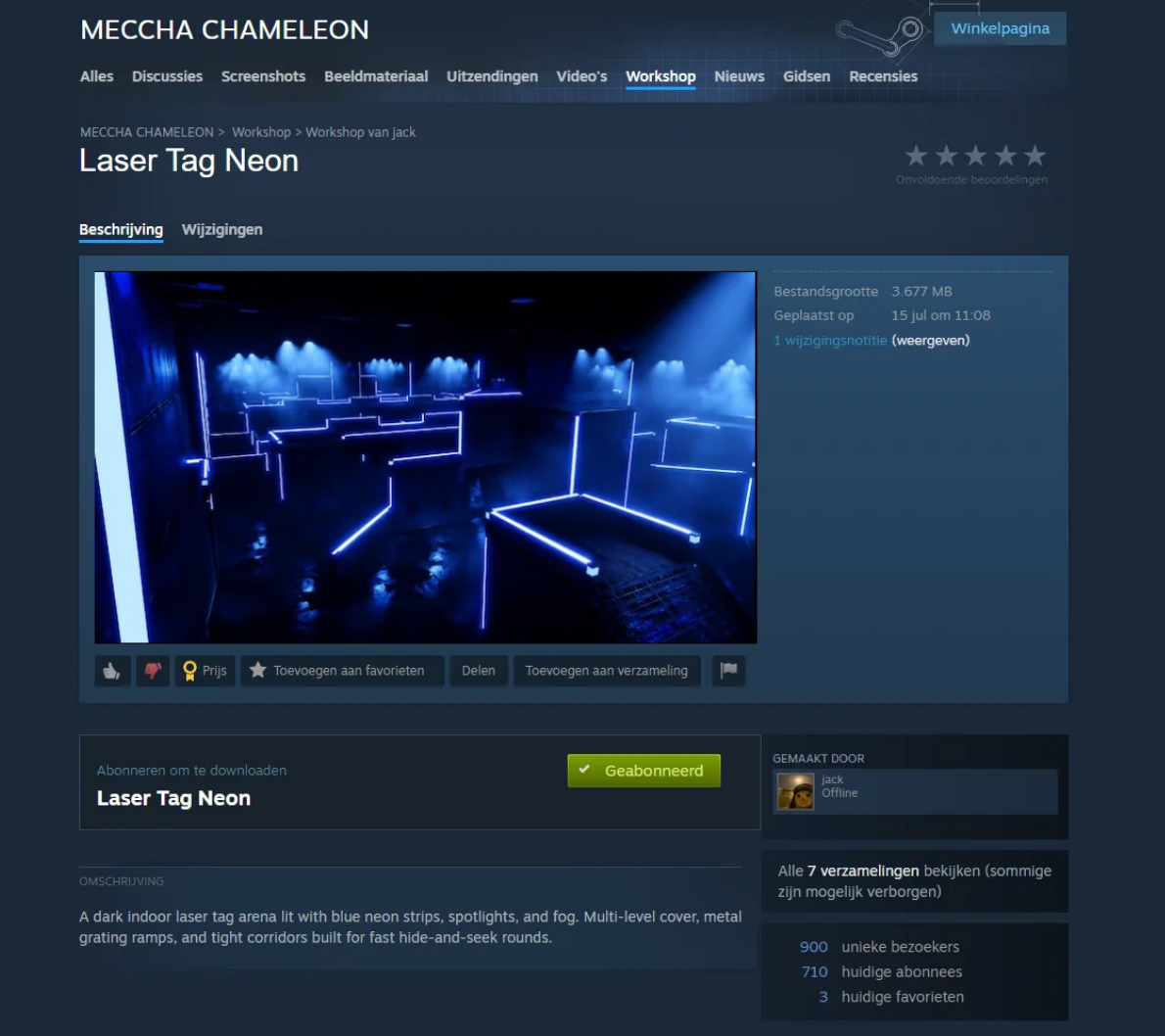
The map Laser Tag Neon featured in this article has now been removed from the Steam Workshop. Unfortunately, there is a new active malicious map called Chroma Grid Arena that’s not yet removed.
A few reminders for everyone:
Only download popular Workshop maps with an established player base.
If the uploader is a brand-new Steam account or has disabled on their Workshop item, consider that a major red flag.
If you played a potentially malicious map, check the following locations for suspicious recently created files, especially .bat files:
It’s also a good idea to review your Startup entries and Task Scheduler for anything unfamiliar, as malware commonly uses these mechanisms for persistence.
Run a malware scan. The tools I recommend are:
If you discover any additional malicious Workshop maps, please report them to Steam so they can be removed as quickly as possible.
EDIT (25 July 2026, 2:00 PM CEST)
The developers have released version 3.1.0 , which fixes the vulnerability that allowed malicious Workshop maps to execute malware. Updating to the latest version is strongly recommended.
It also appears that all currently identified malicious Workshop maps have now been removed from the Steam Workshop. While the immediate threat appears to have been addressed, users should continue exercising caution when downloading Workshop content, as new malicious maps could still be uploaded in the future. As always, verify the uploader and prefer maps from trusted creators with an established player base.
EDIT (25 July 2026, 8:00 PM CEST)
The previously unavailable second-stage payload ( steamb.bat ) has now been recovered and analyzed. It was missing from the original write-up because the attacker's server was offline at the time.
Analysis of the recovered script shows that the second stage downloaded and installed a Remote Access Trojan (RAT) on affected systems, giving the attacker the ability to remotely control compromised PCs. This significantly increases the severity of the attack, as it goes beyond simply executing a batch file and provides persistent remote access to infected machines.
If you launched one of the affected Workshop maps before updating to version 3.1.0, it is strongly recommended that you perform a full malware scan and investigate your system for signs of compromise.
ORIGINAL STORY (23 July 2026, 10 PM CET)
A couple of my friends reported seeing a command prompt window briefly appear while Steam was downloading a custom workshop map. The map was being downloaded through the game’s in-game lobby and, once the download completed it immediately began loading for the match. Since the command prompt window appeared during this transition, I decided to investigate the workshop files.
What I found was a seemingly ordinary workshop map that contained what appears to be a malware dropper, despite having passed workshop review.
I’m writing this up because, as far as I know, the map is still available, and because the techniques it uses to hide are worth understanding if you download workshop content. While there are still a few parts of the execution chain I can’t fully explain, the artifacts themselves are interesting from a reverse engineering perspective.
1): The Initial Symptom
A black command prompt window flashed on screen for a second before disappearing. It appeared while Steam was still downloading the workshop map, just as the game was transitioning into loading it for the match. There were no crashes, error messages, or any other unusual behavior. On its own, it would have been easy to dismiss as Steam running a background process, but seeing a console window appear during a workshop download / match launch was unusual enough that I decided to investigate.
2): First Look at the Workshop Files
The workshop content is located here:
At first glance, there’s nothing suspicious in the folder. The contents are:
There are no executables, DLLs, batch files, or scripts. The .pak , .ucas , and .utoc files are simply the standard Unreal Engine 5 asset container format used for packaging game content exactly what you would expect to see from a UE5 map or mod.
This is worth emphasizing: if you were manually checking this folder for malware, there would be no obvious red flags here. Nothing in this directory suggests anything malicious. That is likely why it passed review in the first place.
3): Verifying the Asset Files
File extensions are easy to spoof, so I checked the actual file headers and scanned the contents for embedded executable data.
The files appear to be valid Unreal Engine asset containers, not disguised executables. There is no standalone executable payload present in this mod. If there is unexpected behavior, it would have to be occurring through the game’s normal asset-loading pipeline rather than from an included executable file.
4): AssetRegistry.bin Reveals the First Clue
This is the detail that stands out most from the entire investigation.
AssetRegistry.bin is largely readable metadata. You can open it in a text editor and see references to the actors placed throughout the maps. Normally, it contains exactly the kind of information you would expect: StaticMeshActor, PointLight, PlayerStart, and other standard Unreal Engine objects.
However, one Blueprint actor immediately stands out:
Its class resolves as:
Those two names together are unusual. The class name suggests a harmless environmental or lighting-related system especially since it appears under folders such as Environment and Lighting. However, the placed actor still retains the older name BP_RCE_Test_C_0.
In Unreal Engine, this can happen because placed actors keep the name they were created with even if the Blueprint class is later renamed. Renaming the class does not automatically rename every existing instance placed in maps.
That means the BP_RCE_Test name likely existed at an earlier point in the asset’s history. Whether intentional or not, the old identifier remains embedded in the map metadata.
The same reference appears across three separate maps included in the workshop item, including a NewMap_Backup file that appears to have been left in the upload.
5): Opening the UE5 Asset Container
The Blueprint data is stored inside the Oodle-compressed .ucas container. Reading the accompanying .utoc metadata reveals:
No encryption flag is present, meaning the container can be inspected using available Unreal Engine asset tooling and compatible Oodle/Kraken decompression support. All 131 blocks decompress successfully, producing roughly 5.3 MB of extracted data.
The container contains 55 assets in total: materials, meshes, textures, four maps, and three Blueprints. Two of those Blueprints appear to be untouched sample assets from the official ModKit, containing no custom logic.
Searching across the extracted asset data revealed only a small number of notable references:
These references are concentrated in a single Blueprint rather than being distributed throughout the package. There does not appear to be additional hidden logic elsewhere in the container, which makes the relevant behavior easier to isolate and analyze.
6): Reverse Engineering the Blueprint
The complete function chain is:
Despite the Blueprint being named like an environment or lighting system, the logic does not appear to perform any lighting, ambience, or world-management functions. Instead, it constructs a file path and writes data to disk.
Tracing the Blueprint bytecode shows the path construction:
ReceiveBeginPlay is normally called when the map begins loading, which does not fully match the behavior reported by some users, who observed activity during the download process itself. That discrepancy is not explained by the Blueprint logic alone, so it is worth treating those reports separately from the behavior confirmed through asset analysis.
7): Extracting the Embedded Payload
A single embedded string inside the Blueprint contains the following data:
The string is structured as a JSON/batch polyglot: it is valid JSON while also containing batch command syntax inside the JSON key. The command content is therefore preserved when written as JSON data, but can also be interpreted as a batch script if the resulting file is executed.
This format is significant because the earlier Blueprint analysis showed that the file-writing step uses ToFile , which writes JSON data. The embedded content appears designed to satisfy that JSON requirement while retaining executable command syntax.
The combination of a JSON-compatible wrapper and embedded command execution logic is not typical of normal Unreal Engine asset data and is a strong indicator that the content was deliberately constructed rather than being accidental or generated by the engine.
8): Analyzing the Dropper Script
The extracted script is also human-readable:
The script uses a simple two-stage execution flow.
On the first run, _Z is not defined, so the script sets the variable, launches a minimized copy of itself, and exits. This relaunch behavior explains the brief command window flash reported by some users. At this stage, the script is acting as a launcher rather than performing the main action.
On the second run, the _Z variable is already present, so the script follows the alternate branch. It starts PowerShell with a hidden window, modifies the execution policy for that process, downloads steamb.bat from a hardcoded external address, saves it to the temporary directory, and executes it.
The _Z check appears to exist solely to prevent the script from repeatedly relaunching itself.
The script itself is relatively simple: there is no evidence here of persistence mechanisms, privilege escalation, or sophisticated obfuscation. Its main purpose appears to be retrieving and executing a second-stage script. That second stage is hosted externally, meaning its contents can change independently of the original mod package.
9): Confirming Execution on an Affected PC
On one affected system, I found a file that was byte-for-byte identical to the payload string embedded in the Blueprint. It was located at the exact path identified during the bytecode analysis.
This confirms that the Blueprint logic was not just theoretical, the file-writing behavior observed during reverse engineering occurred on a real system.
10): Did the second stage execute?
The second-stage file, %TEMP%\s.bat , was not present on the affected machine. The PowerShell Operational log explains why:
The download request failed with an HTTP 404 response at the time of execution. Because the file was never successfully retrieved, nothing was written to disk and the following cmd /c command had no script to execute.
On this system, the second stage did not execute. The contents and behavior of the downloaded payload remain unknown because the external file was unavailable at the time of analysis.
The address embedded in the script resolves to 31.57.34.228 . At the time of analysis, the IP address was geolocated to Amsterdam, Netherlands, and was associated with Blockchain Creek B.V. (ASN 207994).
This information identifies the hosting infrastructure used by the download URL, but it does not by itself identify the operator of the server or establish attribution. The important finding is that the Blueprint attempted to retrieve an additional payload from an external location, rather than containing the final payload entirely within the workshop files.
11): Analysis Summary
Based on the evidence recovered from the workshop item, this should be treated as malicious content. That conclusion does not rely on a single indicator; it comes from the combination of several independent findings:
What remains unknown is the purpose of the final payload. The second-stage script was not successfully retrieved during analysis and was no longer available from the remote location, so its behavior cannot be determined. Claims that it was specifically an infostealer, loader, or another type of malware would be speculation without that payload.
12): Limitations & Unknowns
What does steamb.bat do?
Unknown. The second-stage payload was not delivered during analysis, so its final behavior cannot be determined from the available evidence.
Based on everything I found, I believe this workshop item is very likely malicious, but there are still parts of the execution chain I couldn’t directly observe.
What I can say with confidence is that the asset contains a Blueprint whose only meaningful purpose is to write a batch file outside the game’s directory into the user’s Documents folder. That batch file then attempts to launch PowerShell with the execution policy bypassed, download a second batch file from a hard-coded external server, and execute it.
I can’t think of a legitimate reason for a Steam workshop map to write a .bat file into a user’s Documents folder and then use PowerShell to fetch and run another .bat file from the Internet. Even without knowing what the second stage contained, that behavior is extremely difficult to explain as anything other than a malware delivery chain.
Could there be some edge case I’m missing? Absolutely. That’s why I’ve tried to separate facts from assumptions throughout this write-up. But given the evidence recovered from the assets themselves, I think calling this a malicious dropper is the conclusion best supported by the data
Further independent investigation is encouraged, particularly if additional evidence becomes available. For now, the workshop item and the uploader have been reported and flagged for review.
Cheers and stay safe!
Khael Kugler The technique exploited was originally covered in this blog post:
Eric Parker, Toasts & vx-underground
Reverse engineering the second steamb.bat malware sample
The full story
This article is one source in a clustered incident — the cluster page carries the summary, timeline and every other outlet covering it.
