Threat intelligence API / integrations
Squid
Squid can refuse any request whose destination is on a list. Download the ThreatCluster domain feed to a file, point an access rule at it, and the proxy answers 403 for those domains. The feed is a public text file, so this needs no API key.
Prerequisites
- A Squid proxy you can configure. The screenshots are from Squid 6.13, run in Docker on 29 September 2026.
- The feed address:
https://threatcluster.io/api/iocs/public/domains.txt
Setup
Download the feed to a file, without its comment lines.
curl -s https://threatcluster.io/api/iocs/public/domains.txt \
  | grep -v '^#' | grep . | sort -u > /etc/squid/threatcluster-domains.txt
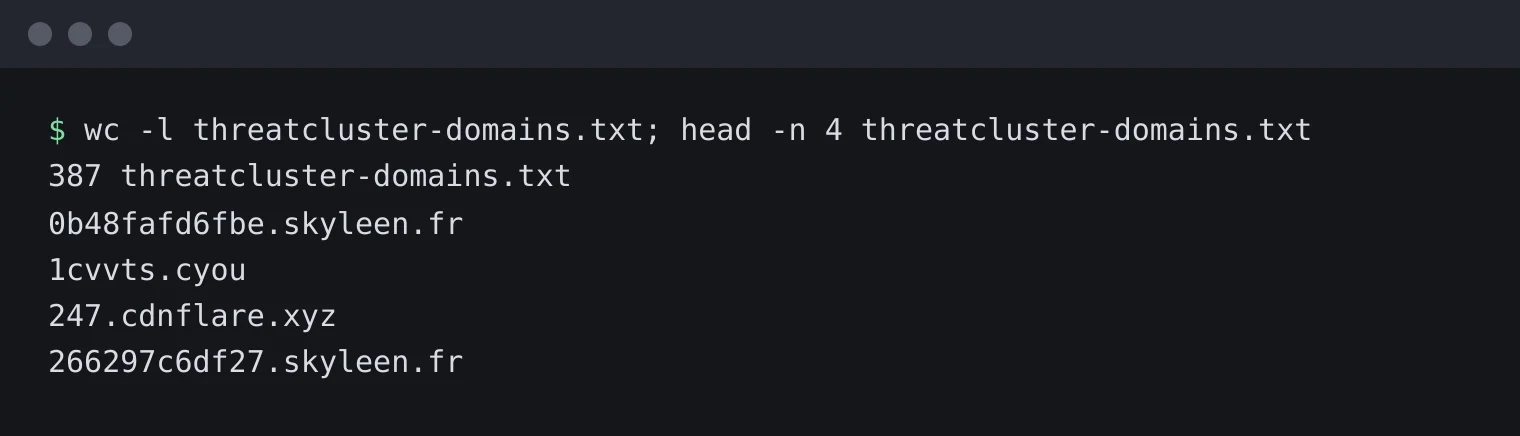
387 domains, one per line. Add two lines to
/etc/squid/squid.conf, above your firsthttp_access allowline. Squid reads access rules top to bottom and stops at the first match.acl threatcluster dstdomain "/etc/squid/threatcluster-domains.txt" http_access deny threatcluster
Then reload:
squid -k reconfigure
Test it through the proxy with one domain from the feed and one that is not on it.
curl -s -o /dev/null -x http://proxy.example:3128 -w "%{http_code}\n" http://fonts.tarotfree101.top/
curl -s -o /dev/null -x http://proxy.example:3128 -w "%{http_code}\n" http://example.org/
403 for the feed domain, 200 for the other. The test ran against a local Squid on port 3128. The access log records the refusal as
TCP_DENIED/403.
The same two requests, from the proxy's side.
Keeping it current
Save the download and the reload as a script and run it daily. crontab -e, then:
30 4 * * * /usr/local/bin/tc-squid-update.sh
Worth knowing
- Subdomains.
dstdomainmatches the exact name. To cover every subdomain of an entry, put a dot in front of it in the file. - HTTPS. Squid sees the host name of an HTTPS request in the CONNECT line, so the rule applies without decrypting anything.
- If a block is wrong. Tell us at /corrections so it comes off the feed for everyone.