 Back Huntress
 When PUPs Grow Fangs: Dragon Boss Solutions' $10 Supply Chain Risk
Acknowledgments: Special thanks to Lindon Wass and Michael Elford for their contributions to this research and blog.
Early in the morning on Sunday, the 22 March, what appeared to be standard adware started triggering alerts across multiple environments managed by Huntress. The executables were using an update mechanism to conceal a multi-stage attack chain designed to systematically disable security tools.
These executables were signed by Dragon Boss Solutions LLC, a company claiming to conduct " monetization research." The signed software silently fetches and executes payloads capable of killing antivirus products, all while running with SYSTEM privileges.
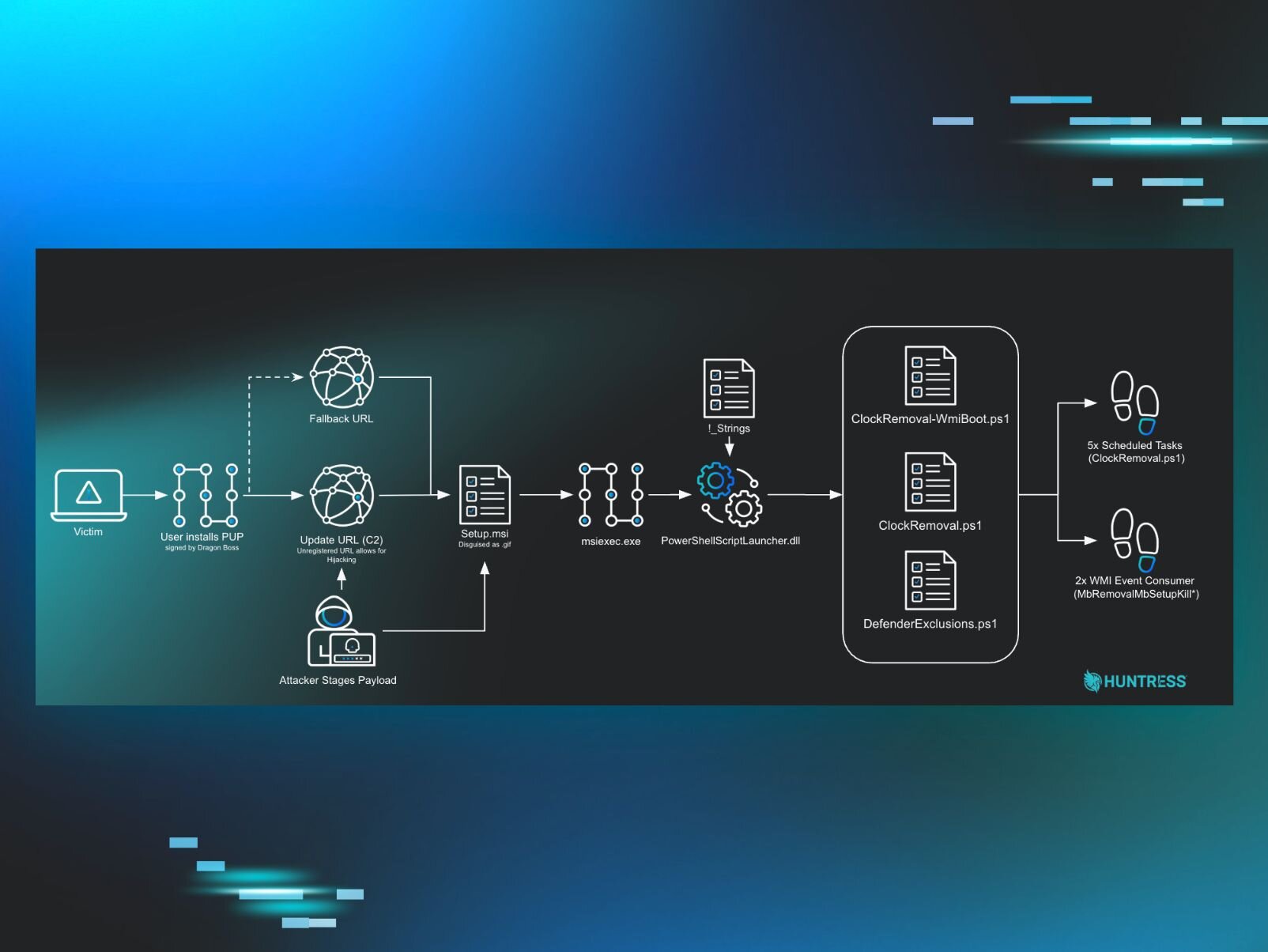
Huntress observed the antivirus killing capability starting in late March 2025, although the loaders/updaters dated back to late 2024. The operation uses an off-the-shelf software update mechanism to deploy these MSI and PowerShell-based payloads. Establishing WMI persistence, it disables security applications, and blocks reinstallation of protective software.
More concerning is it turned out to have an open door baked right into its update configuration, one which anyone with $10 could have walked straight through.
Figure 1: Diagram showing attack path
Most adware/potentially unwanted programs (PUP) don’t get a blog post written them, because they are extremely common and, frankly, boring. At face value this is aggressive adware protecting its revenue stream, however in this case, the combination of AV killing focus and some unregistered domains stood out to us and prompted us to dig in further.
The update mechanism can deploy any payload. At the moment it's an AV killer, but tomorrow it could be ransomware, a cryptominer, or an infostealer. The infrastructure is already in place and now there's no AV watching.
What increases this risk is the primary update domain baked into the operation - chromsterabrowser[.]com - is unregistered. Anyone who registers it gains the ability to push updates to hosts running Dragon Boss Solutions software. This transforms a PUP infection into a potential supply chain compromise.
Fortunately, Huntress found this domain first. So we registered it ourselves, pointed it to a sinkhole, and within hours watched tens of thousands of compromised endpoints reach out looking for instructions that, in the wrong hands, could have been anything.
Our investigation began with two WMI persistence signals.
The naming convention raised concerns: "Mb" refers to Malwarebytes, and "Removal" speaks for itself.
Figure 2: Initial detections for persistence
The clue was a burst of scheduled task creation events just prior to the WMI detections. Four tasks were registered in rapid succession, all pointing to the same PowerShell file:
Figure 3: Further detections for deployed payloads
Digging deeper and tracing the activity back, we identified the source: a signed executable ( RaceCarTwo.exe ) from Dragon Boss Solutions LLC running an install command.
Figure 4: Process history for the executable signed by Dragon Boss Solutions LLC
Looking at child executables revealed Setup.msi .
Figure 5: MSI execution to deploy an “update”
Looking at that task creation again, we see that it’s running out of msiexec and running a script called ClockRemoval.ps1 .
Figure 6: Payload execution post “Update”
Notably, the executables and their install paths follow a pseudo-random naming pattern. However, common similarities can be observed. Names are structured as a [Word][Word][Number] combination (e.g., TableBoatThree , WinSupportNine ). World Wide Web was also very commonly observed.
, the file paths were consistent double-encapsulation. The parent folder appends a suffix ( Solutions , or Workstation ), while a subfolder follows the pattern C:\Program Files (x86)\[Name][Suffix]\[Name]\[Name].exe . This repetition across the majority of samples suggests an automated installer generating both the name and directory structure.
C:\Program Files (x86)\World Wide Solutions\World Wide Web
C:\Program Files (x86)\Web Genius Solutions\Web Genius
ChromsteraUpdater.exe
C:\Program Files (x86)\Chromstera Browser Solutions\Chromstera Browser
ArtificiusUpdater.exe
C:\Program Files (x86)\Artificius Browser Solutions\Artificius Browser
C:\Program Files (x86)\FutureSpaceThreeSolutions\FutureSpaceThree
C:\Program Files (x86)\WinDefenseThreeSolutions\WinDefenseThree
C:\Program Files (x86)\SistemaTownOneWorkstation\SistemaTownOne
C:\Program Files (x86)\TableBoatTwoWorkstation\TableBoatTwo
C:\Program Files (x86)\RaceCarTwoolutions\RaceCarTwo
C:\Program Files (x86)\WaveTownFiveWorkstation\WaveTownFive
C:\Program Files (x86)\WinSupportFiveSolutions\WinSupportFive
C:\Program Files (x86)\WinDefenseFiveSolutions\WinDefenseFive
C:\Program Files (x86)\ProductSetupTwoSolutions\ProductSetupTwo
The grandparent process RaceCarTwo.exe (SHA256: 909539d3ef8dedc3be56381256713fa5545cc7fd3d3d0e0428f7efb94a7e71cb ) had been present on the affected host since 2024. Windows event logs revealed executions of Setup.msi from C:\\Program Files (x86)\RaceCarTwoolutions\RaceCarTwo\updates\Update\ dating back to October 2025.
These files are old, so what changed to put this on our radar?
With the MSI file no longer present on disk (a common challenge when investigating installer-based threats), we turned to a configuration file left behind: RaceCarTwo.ini.
This file revealed that the PUP uses Advanced Installer , an off-the-shelf update mechanism to poll remote servers for installers:
Figure 8: Configuration .ini for the update mechanism
Several configuration flags caught our attention:
No user interaction required; completely silent
Runs with elevated privileges
Polls frequently for new payloads
User cannot disable automatic updates
This is where we made a concerning discovery: the first URL domain ( worldwidewebframework3[.]com ) is unregistered, which piqued our interest. Reviewing the configurations on another host, we identified a second unregistered domain, chromsterabrowser[.]com .
But this time the unregistered domain wasn't a fallback: it was the primary update URL.
That's a meaningful distinction. With the fallback domain on RaceCarTwo, an attacker would only gain execution capability if the primary domain was unavailable or blocked. With chromsterabrowser[.]com , anyone who registered it would be first in line, no filtering or blocking required. Every host running that variant would reach out to this domain for updates, you’d just need to register the domain and serve a malicious payload.
Back to our original host: the main domain ( worldwidewebuniverse3[.]com ) was active and the response pointed to a file named Setup.msi hosted at dl.isready26[.]online and masquerading as a GIF image.
Figure 9: Update pointed to - VT
We now have the MSI file (SHA256: 40ac30ce1e88c47f317700cc4b5aa0a510f98c89e11c32265971564930418372 ), and unzipping it we see it contains several components:
Figure 10: Extracted MSI file contents
Most of these are default files for an Advanced Installer MSI, but a few stand out.
Binary.PowerShellScriptLauncher.dll - VT
Binary.SoftwareDetector.dll - VT
Binary.AICustAct.dll - VT
!_StringData - This includes the instructions/script for the installer to run.
SHA256: 26ddd0712a101b27b018658b4072ad56bb4083026c797b0345b2cce43862fc83
Before deploying the main payload, the installer conducts reconnaissance:
Environment detection ( SoftwareDetector.dll )
Checks admin status ( AI_DETECTED_ADMIN_USER )
Detects virtual machine ( AI_DETECTED_VIRTUAL_MACHINE )
Verifies internet connectivity ( AI_DETECTED_INTERNET_CONNECTION )
AV product reconnaissance ( AI_DetectSoftware )
Queries registry for Malwarebytes, Kaspersky, McAfee, and ESET installations
Sets PowerShell execution policy ( AI_DATA_SETTER_6 )
Set-ExecutionPolicy -ExecutionPolicy Unrestricted -Scope CurrentUser -Force
Executes boot-time WMI script ( AI_DATA_SETTER_1WMI )
Executes main AV killer ( AI_DATA_SETTER )
Runs ClockRemoval.ps1 via PowerShellScriptLauncher.dll
Spawns 6-minute self-termination timer
Start-Sleep -Seconds 360 then kills .tmp processes
The malware author (or more likely AI) that wrote this nicely provided a synopsis and throughout the script detailing its capabilities:
Figure 11: Synopsis at the start of !_StringData/ClockRemoval.ps1
The script writes itself to two locations for redundancy:
%SystemRoot%\System32\config\systemprofile\AppData\Local\WMILoad\ClockRemoval.ps1
A user-profile equivalent path (i.e., C:\Users\JohnDoe\AppData\Local\WMILoad\ClockRemoval.ps1 )
The script maintains an explicit kill list targeting specific security vendors and browser installers:
Figure 12: Processes targeted by ClockRemoval.ps1
The browser installers are likely included because legitimate browsers would potentially interfere with the adware's browser hijacking capabilities.
The script creates five scheduled tasks running as SYSTEM:
Runs ClockRemoval-WmiBoot.ps1 to ensure WMI subscription is active + 30s tight poll-kill of AV processes
DisableClockServicesFirst
Registry-only disable of AV services (runs before AV starts)
DisableClockAtStartup
Full AV removal pass (uninstallers, deep cleanup)
Executes -ScheduledRemovalPass (WMI ensure + kill + removal + hosts block)
Recurring Task - 30 minutes
Executes -ScheduledRemovalPass (continuous monitoring and removal)
For WMI persistence, the script establishes event subscriptions via Initialize-MbSetupWmiKill .
Figure 13: Portion of function Initialize-MbSetupWmiKill in !_StringData/ClockRemoval.ps1
The Win32_ProcessStartTrace subscription catches renamed installers that would evade simple process name matching, like MBSetup (2).exe .
On every system boot, the script executes Invoke-MbSetupWmiBootEnsure to verify WMI subscriptions are intact, recreating them if they've been removed. It then runs Invoke-MbSetupTightPollKill , a tight polling loop that kills matching processes every 100ms for 20 seconds:
Figure 14: Function Invoke-MbSetupTightPollKill in !_StringData/ClockRemoval.ps1
AV processes get killed before they can fully initialize. WMI events alone may have a brief delay, and this polling loop covers that gap.
Following the kill loop, Do-DisableServicesRegistryOnly disables AV services via registry manipulation and strips all AV-related Run keys to prevent them from launching.
At boot, logon, and every 30 minutes, the script executes full removal routines:
Stops services, kills processes, runs vendor uninstallers silently
Process termination followed by file deletion
Deletes installation directories and registry entries
Do-ManualRemovalFallback
Forced deletion when uninstallers fail
The script maintains an embedded JSON database of AV vendor domains to block:
Figure 15: AV domain list embedded in ! _StringData/ClockRemoval.ps1
The Invoke-MbRemovalAvHostsBlock function writes these domains to the host’s file, redirecting them to 0.0.0.0 . The block is wrapped in markers for easy management:
Figure 16: Function Invoke-MbRemovalAvHostsBlock in !_StringData/ClockRemoval.ps1
The modified host file would look like:
# BEGIN AV-UPDATE-BLOCK-v1 (ClockRemoval.ps1)
# Managed block: ClockRemoval.ps1 -AvHostsBlockRevert / -AvHostsBlockApply
# Redirect target: 0.0.0.0 (null-route)
0.0.0.0 data.service.malwarebytes.com
0.0.0.0 downloads.malwarebytes.com
0.0.0.0 activation-v2.kaspersky.com
# END AV-UPDATE-BLOCK-v1
A separate embedded script adds Windows Defender exclusions for directories that will contain the adware's payloads:
Figure 17: Portion of additional script from !_StringData to add Defender exclusions
The script checks if the exclusion paths already exist in Defender's configuration and only adds new ones that aren't duplicates. It also checks if user profile folders actually exist on disk before trying to exclude them. The exclusions it attempts to add are:
Program Files - Google
%ProgramFiles%\Google
Program Files - Google
%ProgramFiles(x86)%\Google
%ProgramFiles%\Microsoft\Edge\Application
%ProgramFiles(x86)%\Microsoft\Edge\Application
User AppData - Google
%LOCALAPPDATA%\Google
%LOCALAPPDATA%\Microsoft\Edge
User AppData - Malware
%LOCALAPPDATA%\DGoogle
User AppData - Malware
%LOCALAPPDATA%\EMicrosoft
User AppData - Malware
%LOCALAPPDATA%\DDapps
%ProgramData%\Chromnius
%ProgramData%\ChromniusEdge
DGoogle , EMicrosoft , and DDapps don't correspond to legitimate software. These appear to be staging directories for follow-on payloads, excluded from Defender scanning before they even exist.
Once Invoke-MbRemovalPersistenceTeardownIfAvClean confirms AV removal is complete, the script tears down most of its scheduled tasks via Remove-OurScheduledTasks. However, it permanently retains:
WMI event subscriptions
This ensures the endpoint remains "protected" against AV reinstallation indefinitely.
Looking at our example host, we see it successfully nuked “ESET Security” with it no longer being present, along with the exclusions that were added.
Figure 18: Installed security products on infected host
According to CrunchBase, Dragon Boss Solutions “engages in research to find the best Monetization Solutions for Browser Extensions, Software and Desktop Applications” and is located in Sharjah, United Arab Emirates.
Figure 19: CrunchBase listing for “Dragon Boss Solutions”
Although their website is currently offline, there are scans available that show a different location.
Figure 20: URLScan.io listing for
Historically, their signature has been tracked as adware by AV companies. Detections list DragonBoss and Chromnius , and it is widely categorized as a PUP with browser hijacking functionality.
Looking into Chromnius we can find an old website that they use to distribute their PUP through, although now it redirects to a malware removal guide.
Figure 21: URLScan.io listing for
Searching across our environment, we observed the Dragon Boss Solutions code signing certificate on modified Chrome.exe binaries executing with a notable command-line flag:
"C:\Program Files\Google\Chrome\Application\chrome.exe" --simulate-outdated-no-au="01 Jan 2199"
This flag disables Chrome's auto-update mechanism entirely, locking users into a potentially vulnerable, modified browser version. These binaries have positive detections on VirusTotal .
Figure 22: VT listing for modified Chrome Binary
That unregistered domain concerned us to say the least. With SYSTEM level code execution possible and AV already disabled on affected hosts, it represented a genuine risk from anyone willing to spend a few dollars on a domain registration.
Our first step was to understand exactly how this update mechanism behaved. We extracted the updater executable and configuration file ( ChromsteraUpdater.ini ) from an infected host and moved it into a controlled lab environment,with the goal of demonstrating the attack chain and confirming that the unregistered domain was actually being used in the wild.
Setting up the test environment required recreating the infection conditions in a safe environment. We copied the Dragon Boss Solutions binary and its configuration to a Windows VM, modifying the update URLs to strip the TLS requirement as a bare functional proof-of-concept. TLS was later introduced to validate the required signing conditions. All configured domains were intercepted by local DNS resolvers and pointed towards lab tooling.
We recreated the malicious update package by feeding a simple PowerShell payload (in this case, launching calc.exe ) into an MSI bundle that would be accepted by the Windows Installer Service. The resulting MSI was renamed to match the expected filename format ( ldk4945jfds.gif ) and placed in the staging directory. An updates.txt file was crafted to mirror the legitimate Dragon Boss update manifest, pointing to our malicious payload.
Figure 23: Update pointed to
To trigger the update, we registered a scheduled task matching the persistence mechanism observed on victim hosts, running ChromsteraUpdater.exe with elevated privileges, as per the conditions on each infected host. When executed, the updater immediately reached out to our controlled server, downloaded the fake "update," and silently installed it without any user interaction. These elevated levels of persistence ensured there would be no UAC or alarms related to the installation of an unsigned MSI package.
Figure 24: Hijacking the update URL in a lab environment
The test confirmed what we suspected; the update mechanism was fully functional, completely silent, and would execute any payload we provided. If an attacker registered that unregistered domain, they would inherit this exact capability across every infected host.
Notable nuances presented themselves, in that when the C2 channel was TLS protected (HTTPS) the website needed to be signed by a trusted CA; self signing did not work. Furthermore, the size of the distributed MSI needed to match a configured payload. If either of these conditions were overlooked, then the payload would fail to execute and the infected device would present an error to the user.
To verify this wasn't just a lab curiosity, Huntress registered “ chromsterabrowser[.]com “ and “ worldwidewebframework3[.]com ” before anyone else could. We stood up monitoring infrastructure and pointed DNS records to a sinkhole, then watched to see if any infected hosts would reach out.
They did. Immediately.
Over a 24-hour observation period, we captured connection attempts from infected endpoints, all running Dragon Boss Solutions software and reaching out to our newly registered domain. These were real systems in production environments, already compromised, already running with disabled antivirus protection, and now attempting to download whatever we serve them. Fortunately, Huntress found it first, so all these requests are simply getting sinkholed.
Over the 24-hour monitoring period, our sinkhole infrastructure captured the following statistics from infected hosts attempting to download updates from the unregistered domain.
23,565 unique IP addresses connected to the sinkhole during the 24-hour observation period, representing active infections attempting to communicate with the malicious infrastructure.
The infected hosts spanned multiple countries, with infections detected all around the globe:
Figure 25: Heatmap of unique IP address locations
The infected hosts spanned 124 countries across all continents, with the following top regions by infection count:
United States - 12,697 hosts (53.9%)
France - 2,803 hosts (11.9%)
Canada - 2,380 hosts (10.1%)
United Kingdom - 2,223 hosts (9.4%)
Germany - 2,045 hosts (8.7%)
In a particularly concerning finding, based on the IP addresses observed, we identified 324 infections within high-value target networks, including:
221 Universities and Colleges - Academic institutions across North America, Europe, and Asia
41 Operational Technology networks - Electric utilities, power cooperatives, transport networks, and critical infrastructure providers
35 Government entities - Municipal governments, state agencies, and public utilities
24 Primary and secondary educational institutions
3 Healthcare organizations - Hospital systems and healthcare providers
Additionally, infections were observed within networks of multiple Fortune 500 companies
These high-value targets represent approximately 1.4% of all observed infections but pose a significantly elevated risk due to the sensitive nature of their operations and data.
What began as an adware alert turned out to be something far more deliberate. Dragon Boss Solutions' browser-hijacking PUP is signed with a legitimate code-signing certificate, hides behind a trusted update mechanism, and silently deploys a sophisticated AV killer. The payload, ClockRemoval.ps1 , does not just disable security tools: it blocks their update domains, strips their registry entries, poisons the host’s file, carves out Defender exclusions for future payloads, and ensures persistence on every reboot through WMI event subscriptions and scheduled tasks. This is not adware getting aggressive. It is adware with an evolving playbook, blurring the lines with traditional threats.
The broader concern is that the domain baked into the update configuration was available for the taking before we registered it. Anyone who registered the domain chromsterabrowser[.]com would have gained the ability to push arbitrary payloads to every host running this variant of the software, no exploitation required. The infrastructure was already built and waiting, with AV already disabled at that.
This is a good lesson in the risks hiding inside PUPs. While PUPs are often dismissed as an annoyance or noise, in this case we treated these detections as a priority incident rather than routine adware cleanup. Go and hunt in your environment for the WMI artifacts and scheduled tasks outlined above, or just anything with a “Dragon Boss Solutions” signature. PUPs have long occupied a grey area in security. This campaign is a reminder that grey can turn dark very quickly.
Hunt for WMI event subscriptions containing "MbRemoval" or "MbSetup" in the consumer name
Monitor for scheduled tasks referencing WMILoad directories or ClockRemoval
Alert on processes signed by Dragon Boss Solutions LLC
Review Windows “hosts” files for blocks against AV vendor domains
Check Defender exclusions for suspicious paths like DGoogle , EMicrosoft , or DDapps
909539d3ef8dedc3be56381256713fa5545cc7fd3d3d0e0428f7efb94a7e71cb
Initial Loader/Updater
40ac30ce1e88c47f317700cc4b5aa0a510f98c89e11c32265971564930418372
26ddd0712a101b27b018658b4072ad56bb4083026c797b0345b2cce43862fc83
feb13087c43406da7f2cea26b003a9b93db0e6b544b10bd57342d5dbbb18ba02
ClockRemoval.ps1 (Manually reconstructed)
da6aba50f9908f5f29d877dfaaca1ef6e03d597bb7b52bd294b4ec644fe7e6c0
worldwidewebuniverse3[.]com
worldwidewebframework3[.]com
worldwidewebframework2[.]com
artificialupdates[.]com
chromsterabrowser[.]com
chromsteraupdates[.]com
C:\Program Files (x86)\World Wide Solutions\World Wide Web\
Installation directory
C:\Program Files (x86)\World Wide Solutions\World Wide Debug\
Installation directory
C:\Program Files (x86)\WinSupportSixSolutions\WinSupportSix\
Installation directory
C:\Program Files (x86)\WinSupportFiveSolutions\WinSupportFive\
Installation directory
C:\Program Files (x86)\WinSupportNineSolutions\WinSupportNine\
Installation directory
C:\Program Files (x86)\WaveTownFiveWorkstation\WaveTownFive\
Installation directory
C:\Program Files (x86)\FutureSpaceThreeSolutions\FutureSpaceThree\
Installation directory
C:\Program Files (x86)\Web Genius Solutions\Web Genius\
Installation directory
C:\Program Files (x86)\TableBoatNineWorkstation\TableBoatNine\
Installation directory
C:\Program Files (x86)\TableBoatTwoWorkstation\TableBoatTwo\
Installation directory
C:\Program Files (x86)\TableBoatThreeWorkstation\TableBoatThree\
Installation directory
C:\Program Files (x86)\SistemaTownOneWorkstation\SistemaTownOne\
Installation directory
C:\Program Files (x86)\SistemaTownThreeWorkstation\SistemaTownThree\
Installation directory
C:\Program Files (x86)\RaceCarTwoolutions\RaceCarTwo\
Installation directory
C:\Program Files (x86)\ProductSetupTwoSolutions\ProductSetupTwo\
Installation directory
C:\Program Files (x86)\WinDefenseThreeSolutions\WinDefenseThree\
Installation directory
C:\Program Files (x86)\WinDefenseFiveSolutions\WinDefenseFive\
Installation directory
C:\Program Files (x86)\Chromstera Browser\
Installation directory
C:\Program Files (x86)\Local World Solutions12\Local World Service12\
Installation directory
C:\Program Files (x86)\Local Net Solutions17\Local Net Service17\
Installation directory
C:\Program Files (x86)\Local Net Solutions19\Local Net Service19\
Installation directory
C:\Program Files (x86)\LocalNetSolutionsEight40\LocalNetServiceEight40\
Installation directory
C:\Program Files (x86)\GeneralAISupport1Solutions\GeneralAISupport1\
Installation directory
C:\ProgramData\World Wide Solutions\World Wide Web\updates\
Update staging directory
%SystemRoot%\System32\config\systemprofile\AppData\Local\WMILoad\
Dragon Boss Solutions LLC
MbRemovalMbSetupKillConsumer
MbRemovalMbSetupKillConsumerTrace
DisableClockServicesFirst
DisableClockAtStartup
Recurring Task - 30 minutes
%LOCALAPPDATA%\DGoogle
%LOCALAPPDATA%\EMicrosoft
%LOCALAPPDATA%\DDapps
%ProgramData%\Chromnius
%ProgramData%\ChromniusEdge
The full story
This article is one source in a clustered incident — the cluster page carries the summary, timeline and every other outlet covering it.
